

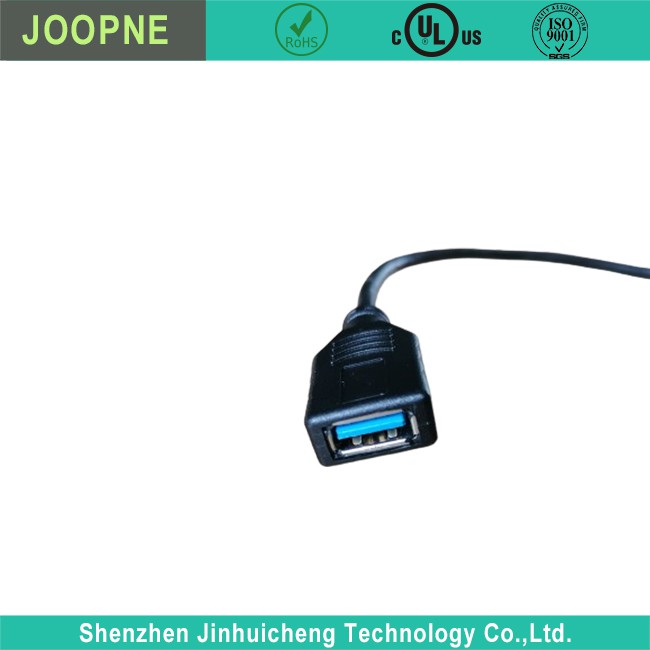

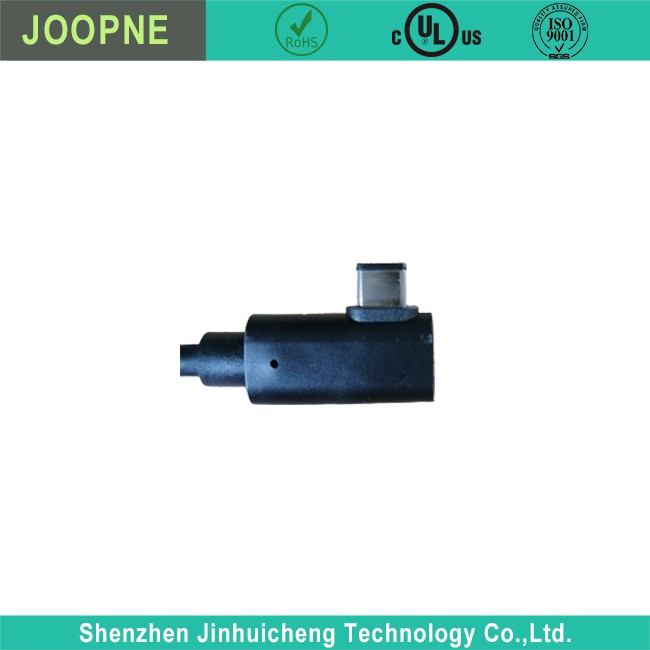
USB Type C/M To USB3.0 AF Cable
Type C to USB3.0 Cable Type C to USB3.0 Cable Description Type C to USB3.0 Cable Parameter Type C to USB3.0 Cable Introduction A Type-C to USB 3.0 cable is an essential accessory for connecting USB-C devices to USB-A ports. Here’s an introduction to what this cable is and its uses: USB…
Product Introduction
Type C to USB3.0 Cable
Type C to USB3.0 Cable Description

|
· Waterproof Resistant |
|
· 32 AWG(US), 4.7mm OD (EU, UK)universal cable |
|
· Suitable for most andriod phones with type c connector |
|
· UL listed for safety; IEC standard; durable design for long-lasting strength and performance |
Type C to USB3.0 Cable Parameter
|
Rated Voltage: |
5V-20V |
|
Rated Current: |
0.9A-5A |
|
Connector Pin: |
9Pin |
|
Power Supply: |
Electric |
Type C to USB3.0 Cable Introduction
A Type-C to USB 3.0 cable is an essential accessory for connecting USB-C devices to USB-A ports. Here’s an introduction to what this cable is and its uses:
USB Type-C Connector:
This is the newest type of USB connector, known for its reversible plug orientation and cable direction, which means you can insert it without worrying about which side is up. It’s becoming the standard for new devices, including the latest smartphones, laptops, and tablets.
USB 3.0 (Also Known as USB 3.1 Gen 1):
This refers to the third major version of the Universal Serial Bus (USB) standard for interfacing computers and electronic devices. USB 3.0 offers increased transfer rates up to 5 Gbps, which is significantly faster than its predecessor, USB 2.0.
The Cable:
A Type-C to USB 3.0 cable has a USB-C connector on one end and a USB-A connector on the other. This allows you to connect devices with a USB-C port to devices with a USB-A port, such as a laptop or PC, enabling data transfer and charging.
Common Uses:
Data Transfer:
You can use the cable to transfer data between a USB-C device and a USB-A device.
Charging:
The cable can also be used to charge USB-C devices.
Peripheral Connection:
It’s useful for connecting peripherals like external hard drives, printers, or mice that have a USB-A connector to a computer with a USB-C port.
Key Features to Consider:
Data Transfer Speed:
A good quality Type-C to USB 3.0 cable should support fast data transfer speeds of up to 5 Gbps.
Build Quality:
A durable, well-made cable with robust connectors and a strong cable sheath is less likely to suffer from wear and tear.
Power Delivery:
Some cables support USB Power Delivery (PD) for faster charging of devices, which is particularly useful for charging laptops or tablets that can accept charging over USB-C.
Length:
They come in various lengths, typically ranging from about 3 feet (1 meter) to 6 feet (2 meters), but it’s possible to find shorter or longer ones depending on your needs.
When purchasing a Type-C to USB 3.0 cable, it’s important to look for certified products that adhere to the USB-IF standards to ensure compatibility and safety.
Frequently Asked Questions
Type C to USB3.0 Cable
Is USB 3.0 the same as USB-C??
+
–
No, USB 3.0 and USB-C are not the same. USB 3.0 is a version of the USB standard that allows for faster data transfer speeds, while USB-C is a type of connector that is reversible and can support various USB versions and other data protocols.
What is a USB 3.0 cable?
+
–
A USB 3.0 cable enables high-speed connection and data transfer according to the USB 3.0 standard. It has different connectors for different devices: 1. Type-A: This is the standard rectangular connector found on most USB cables. USB 3.0 Type-A connectors are usually blue inside to differentiate them from USB 2.0 connectors. 2. Type-B: This square connector is commonly used for printers and other powered devices. The USB 3.0 Type-B connector is slightly larger than the USB 2.0 version to support faster data transfer. 3. Micro-B: The Micro-B connector is small and often found on smartphones and tablets. The USB 3.0 Micro-B connector has an additional set of five pins to enable faster transfer rates. 4. USB-C: Although not exclusive to USB 3.0, a USB-C cable can carry USB 3.0 signals. A USB 3.0 cable supports data transfer rates of up to 5 Gbps, which is 10 times faster than USB 2.0. It also offers improved power efficiency. It’s important to note that using a USB 3.0 cable with a USB 2.0 device or port will only provide USB 2.0 speeds because the transfer rate is limited by the USB 2.0 technology.
Is USB 3.2 faster than USB-C?
+
–
USB 3.2 and USB-C are different but related. USB 3.2 is an updated version of the USB 3.1 standard, while USB-C is a type of connector. USB 3.2 allows for faster data transfer rates, depending on the number of lanes used and the type of USB-C cable and connector. USB-C, on the other hand, can support various USB standards and other protocols. However, the speed of a USB-C connector depends on the USB specification it supports. So, while a USB-C cable supporting USB 3.2 can achieve higher data transfer speeds, it’s important to check the specific USB standard that the cable or device is designed for.
Does USB 3.0 require a special cable?
+
–
To fully utilize USB 3.0 capabilities, a special cable designed for USB 3.0 is necessary. USB 3.0 cables are built to handle higher transfer speeds of up to 5 Gbps, which USB 3.0 devices and ports can achieve. These cables have extra conductors and shielding to support SuperSpeed data transmission and minimize signal interference. USB 3.0 cables are usually blue in color, making it easier to differentiate them from USB 2.0 cables, which are typically black or white. Additionally, the USB 3.0 Type-B and Micro-B connectors have a different physical design compared to their USB 2.0 counterparts, with more pins to support faster data rates. While USB 3.0 devices and cables are compatible with USB 2.0 ports and cables, they will only operate at USB 2.0 speeds in this scenario. To achieve USB 3.0 speeds, both the device and the port must be USB 3.0 compliant, and a USB 3.0 cable must be used.
Hot Tags: usb type c/m to usb3.0 af cable, China usb type c/m to usb3.0 af cable manufacturers, suppliers, factory, wire harness manufacturers, dryer extension cord, 3 prong cord for stove, Formable coaxial cable, ncl50 lvds cable, overmolded cable assemblies
Send Inquiry
