



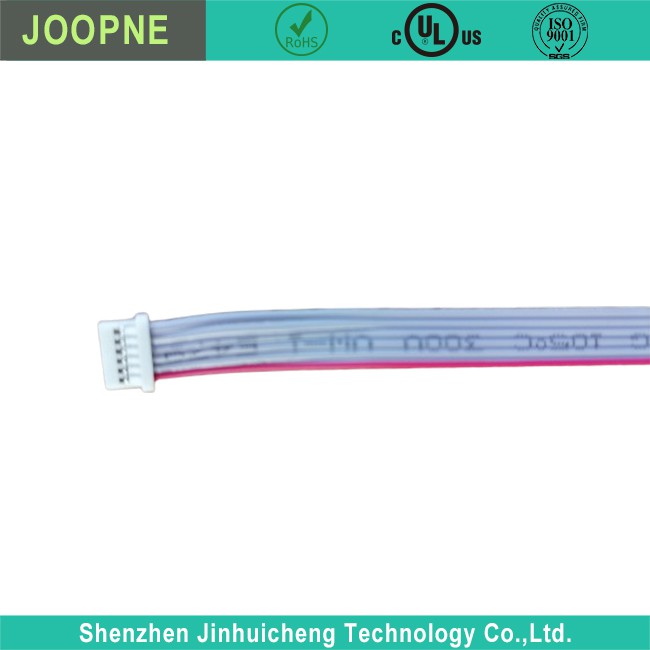
Button Control Cable
Button Control Cable Button Control Cable Introduction Button Control Cable Parameter Button Control Cable Description The “button control cable” you’re referring to seems to be related to the internal cable that connects the computer/monitor’s buttons (like power, menu,…
Product Introduction
Button Control Cable
Button Control Cable Introduction

|
· Fire Resistant |
|
· UL2651 28AWG Ribbon cable |
|
· Suitable for different button with a lower pin |
|
· UL standard; IEC standard; durable design for long-lasting strength and performance |
Button Control Cable Parameter
|
Rated Voltage: |
3.5V-5V |
|
Rated Current: |
Low Current |
|
Power Cord Plug: |
Low Quanqity Pins |
|
Power Supply: |
Electronic |
Button Control Cable Description
The “button control cable” you’re referring to seems to be related to the internal cable that connects the computer/monitor’s buttons (like power, menu, volume, etc.) to its control board. This is not typically a user-serviceable part, as it is integrated within the computer/monitor’s housing. Here’s a basic understanding of this component:
Computer/Monitor Button Control Cable Components:
– Physical Buttons: These are the buttons you press on the computer/monitor’s bezel or side.
– Control Cable: A ribbon cable or series of wires that connect these buttons to the main control board inside the computer/monitor.
– Control Board: The PCB (printed circuit board) that interprets button presses and sends the corresponding commands to the monitor’s firmware to adjust settings like brightness, contrast, or to turn the monitor on or off.
Handling Computer/Monitor Button Control Cable:
– For Repair or Replacement: If you’re looking to repair or replace this cable, it typically involves disassembling the computer/monitor. This should only be done if you have experience with electronics repair or by a professional, as it can be easy to damage the computer/monitor further.
– Replacement Parts: Finding a replacement control cable can be difficult, as they are not standard across different models or brands of computer/monitors. You would need to find a part specific to your computer/monitor’s make and model, often from the manufacturer or a specialized electronics parts supplier.
– Safety Precautions: Always ensure the computer/monitor is unplugged and powered down before attempting any disassembly. Monitors can retain electric charge even after being unplugged.
If your computer/monitor buttons are not functioning correctly, it is usually more practical to contact the manufacturer for support or take the computer/monitor to a certified repair center. Opening up a computer/monitor can void warranties and, if done incorrectly, can be a safety hazard.


Hot Tags: button control cable, China button control cable manufacturers, suppliers, factory, fpc ribbon, mc4 extension cable, molded cable assembly, high frequency rf coaxial cable, 12v battery jumper, cable driven robotic arm

Send Inquiry
